PUBG Changing these settings will make you Pro – TechWeu
Set graphics settings by phone
When the PUBG Mobile is first opened on the phone, the game sets the graphics settings according to the smartphone, but sometimes changing the graphics also gives a good effect on the gameplay. New mid-range smartphones coming today also have the ability to run PUBG Mobile at high graphics settings, but still, if you feel that the game sometimes lags or the phone gets hot after playing for a while, You can reduce the graphics on the game’s settings.
For this, you need to ‘Settings’ Go to and right there ‘Graphics’ Tap on Here you will find many options. If you are running a mobile phone with good hardware and a high-speed stable internet connection, you can make these settings at high, and if your phone is a bit old or a budget smartphone, you can change the settings to mid or low tomorrow. Many times, on a budget phone, the graphics are low and the frame rate is increased even if the fun of playing the game increases. These settings depend on the user’s phone and internet connection, so we would advise you to try them out according to your game.
Change visual style
Mobile phone ‘Settings’ inside ‘Graphics’ You will also see some visual options. Here Classic, Colorful, Realistic, or Soft There are options. This changes the color tone in the game. While this only makes the game different in terms of appearance, some players claim that Colorful Mode helps them spot enemies easily. However, these are only claims and we do not confirm them. PUBG mobiles have a lot of colorful outfits, and this may be the reason why players will see these outfits more colorful in colorful mode, which makes them look like players hiding in the grass.
Although our team has different opinions on this, most people like the classic modes. In such a situation, we suggest that you check all these options by yourself and find out which option suits you according to your phone.
Set controls
Not only the new players, but the masters of PUBG Mobile are also often looking for control settings. In this game, players have countless options to set their controls. In the game, the player can set the buttons anywhere on the screen according to his own. In such a situation, many players keep searching for the best pubg control settings on the Internet. You can control your controls ‘Settings’ Coming right inside ‘Controls’ At the option
Tap and change. Here you will find many pre-set settings. The player also has 3 layouts inside these three presets. You can save three types of settings here. You can save three types of settings in each layout according to you.
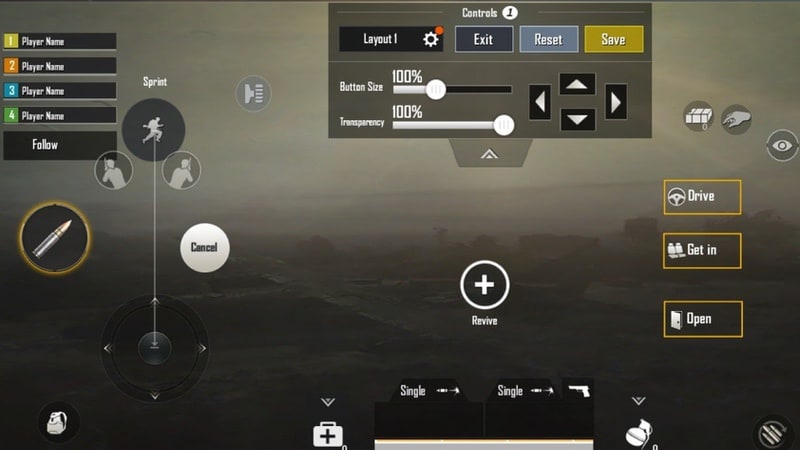
If you use a trigger, you can set one layout according to the trigger settings and set the other two to close grip settings or normal settings. Many players set these layouts according to the different button sizes.
Set the car controls also
Like the player, you can also set the controls of the car. The game comes with three pre-set options. It completely depends on you which option you choose. We would advise you to play some games with these three settings and see what settings you are able to drive well. For this you game ‘Settings’ Go to the fourth number tab ‘Vehicle’ Choose
Turn on am assist
If you are a new player then this Aim Assist Will work for you Aim Assist makes it easier to hit the enemy. Turning it on will automatically put an Aim on the enemy in the game, but remember that it is not accurate, but if you are a new player, it would be good for you to start with Aim Assist, but we will give you this after a while. I would recommend turning off the option. You also need to play ‘Am Assist’ Settings inside Basic Can see at the top of the tab.
Turn on peak and fire
This option is turned off by default in the game. You may have seen many players peeping through the building windows, doors, or behind trees and stones in the game. It is awesome for peak and fire. With Peak & Fire, you can peek out behind a cover just by taking your head out and shooting enemies. This hides your body inside the lid and makes you less likely to be shot. If you master this feature then you can save yourself and reach the chicken dinner easily. Peek & Fire You game Settings Coming right inside ‘BasicCan see inside the tab.
Additionally, an option Peek & Open Scope Also happens. In the peak and open scope option, the scope opens automatically as soon as you press the peak button. We would advise you to enable this option as well. You can see this option next to Peak and Fire.
Set automatic loot limit
In PUBG Mobile, your character automatically picks up the loot, but you can also choose the limit of the loot from yourself. The game has a limit for each category, in which it is pre-determined how many bullets or gunpowder your character will pick up. You can change it by yourself. We would advise you to reduce the number of bullets slightly and increase the number of health and grenades slightly. You can also set ammo according to the guns in it. Game for this option ‘Settings’ Go to and the sixth tab on the right. Pick Up ‘ Open. Here you can make your own setting.

Change sensitivity
According to the new player the sensitivity in the game is reduced, but even then changing it can make your game better. Sensitivity means how sensitive your touch is. Sliding your thumb or finger across the screen allows you to change how fast the player turns or your gun. If you reduce the sensitivity of the game, then sliding the finger or thumb on your screen, the player slowly turns and if you have opened the scope of the gun, your gun moves slowly. If you increase the sensitivity then this work is done faster. If you are a new player, we will give you sensitivity ‘Take’ or ‘Medium’ Would recommend keeping at
With this, you can easily move your player around and it will also be easy for you to open the score and aim. You can also set different sensitivity for different scores, but we can set you up in the beginning ‘Take’ And ‘Medium’ Would recommend to keep up with the settings. This setting allows you to ‘Settings’ Fifth tab inside ‘Sensitivity’ But you can change it.
[content-egg module=AE__flipkartcom template=list]
Change the color of the crosshairs
Crosshairs speak of the gun em coming to your game, which is’+‘ looks like. The game also has many color options. You can change its color according to you. We would advise you to apply the color that you can comfortably see in the grass. You can set different colors on the crosshairs of different scopes. For this you need a game Settings Go to the seventh tab on the right ‘Scope’ Have to choose.
Turn off mic and speaker
Every new player of PUBG Mobile is often heard shouting at other players or sometimes because you are not playing well. In such a situation, new players are unable to focus on their game due to anger. Let me tell you here that now PUBG Mobile has given many options for mic and speaker. In the game, you can turn off your mic. If you are upset with the other players of your team, then you will come to the right of the screen Speaker You can turn off the voice of the entire team through the icon. You also have this option if you want to reduce or stop the voice of one player in the team. For this, you Speaker And tap the player’s Name Volume bar on Slide Have to do. This will allow you to focus better on your game.